
Updated August 7th, 2026
Let me be upfront about one thing: a tablet is not a diagnostic workstation. No current consumer tablet is calibrated to DICOM standards, and none is approved for primary diagnostic reading in most jurisdictions. But that doesn’t mean tablets are irrelevant for radiologists — quite the opposite. Used correctly, a tablet is one of the most practical tools in a radiologist’s daily workflow.
I use a tablet regularly for on-call image review, bedside consultations, and teaching. The ability to pull up a CT on a high-quality screen, scroll through axial slices with a finger, and annotate a finding for a colleague is genuinely useful — particularly outside the reading room. Think of it as a complement to your workstation, not a replacement.
With that framing in mind, here are the best tablets for radiologists in 2026. For more on the full teleradiology setup, also read our guide on the best laptops for radiologists and how to set up the best teleradiology workstation.
The Best Tablets for Radiologists — Top 5 in 2026
What Makes a Good Tablet for Radiology?
Display: The Non-Negotiable
The display is everything. For reviewing CT or MRI series on a tablet, you need high resolution (at least 2560 x 1600 in 2026), good brightness (600+ nits for usability in varied lighting), and wide color accuracy. OLED or high-quality IPS panels both work, but OLED offers superior black levels. None of these displays are DICOM-calibrated. For preliminary review, on-call consultation, and teaching, this is acceptable.
Screen Size
I wouldn’t go below 11 inches. For comfortable scrolling through axial CT slices or comparing two series side by side, 12–13 inches is the practical sweet spot.
PACS Compatibility and Operating System
iPads (iPadOS) have excellent PACS app support. Windows tablets like the Surface Pro run full Windows 11, which means you can use the desktop PACS client directly. Android tablets have fewer dedicated radiology apps, but browser-based zero-footprint viewers work well on any platform.
Stylus Support
For annotations, measurements, and teaching, a good stylus makes a real difference. The Apple Pencil Pro and Samsung S Pen are both excellent.
Performance and RAM
Scrolling through a thin-sliced CT series requires real processing power. Anything below 8 GB RAM will feel sluggish with large studies. The Apple M-series chips set the current standard.
The Best Tablets for Radiologists — In Detail
1. Apple iPad Pro 13” M4 — Best Overall

Specifications
- Display: 13” Ultra Retina XDR Tandem OLED, 2752 x 2064 (264 ppi), 1.000 nits sustained, ProMotion 120Hz
- Chip: Apple M4 (9-core CPU, 10-core GPU)
- RAM: 8–16 GB
- Storage: 256 GB – 2 TB
- Connectivity: USB-C Thunderbolt 4, Wi-Fi 6E, optional 5G, Face ID
- Stylus: Apple Pencil Pro (sold separately)
- Weight: 579 g
Pros
- Best display of any tablet: Tandem OLED delivers exceptional contrast for DICOM image review
- M4 chip handles large CT series without hesitation
- Excellent PACS app ecosystem: OsiriX HD, vendor mobile viewers, browser-based viewers
- Apple Pencil Pro for precise annotations
- Thunderbolt 4 — can drive an external monitor if needed
Cons
- iPadOS limits some PACS workflows — usually limited to mobile or browser-based viewers
- Apple Pencil Pro sold separately and expensive
- Premium price
2. Microsoft Surface Pro 11 — Best Windows Tablet

Specifications
- Display: 13” OLED 2880 x 1920, 120Hz, anti-reflective
- Processor: Snapdragon X Elite (12-core)
- RAM: 16–64 GB
- Storage: 256 GB – 1 TB SSD
- OS: Windows 11 (full desktop)
- Connectivity: Thunderbolt 4, Wi-Fi 7, optional 5G
- Battery: up to 14 hours
Pros
- Full Windows 11 — run your desktop PACS client directly
- No compatibility compromises: RadiAnt, Visage, Sectra, Synapse all work natively
- Anti-reflective OLED display — useful in bright environments
- Fanless design — silent in reading environments
Cons
- Snapdragon ARM processor: some older PACS plugins may have x86 compatibility issues
- Keyboard and pen sold separately
3. Samsung Galaxy Tab S10 Ultra — Best Large Display

Specifications
- Display: 14.6” Dynamic AMOLED 2X, 2960 x 1848, 120Hz, HDR10+, anti-reflective
- Processor: MediaTek Dimensity 9300+
- RAM: 12 GB
- Storage: 256 GB – 1 TB, expandable via microSD
- OS: Android 14
- Stylus: S Pen included
- Battery: 11.200 mAh, 45W fast charging
Pros
- 14.6” screen — largest in category, excellent for MDT presentations
- S Pen included — no extra cost for stylus
- Anti-reflective AMOLED with deep blacks
- microSD expansion for local DICOM teaching cases
Cons
- 14.6” is unwieldy for on-call pocket use — better for desk or meeting room
- Fewer dedicated radiology apps than iPadOS
4. Apple iPad Air 13” M2 — Best Value iPad

Specifications
- Display: 13” Liquid Retina IPS, 2732 x 2048 (264 ppi), 600 nits
- Chip: Apple M2 (8-core CPU, 10-core GPU)
- RAM: 8 GB
- Storage: 128 GB – 1 TB
- Connectivity: USB-C, Wi-Fi 6E, optional 5G, Touch ID
- Weight: 617 g
Pros
- Same 13” screen size as iPad Pro at a lower price
- M2 handles PACS viewing and large CT series comfortably
- Full iPadOS ecosystem including OsiriX HD
- Lighter and cheaper than the Pro
Cons
- IPS display, not OLED — contrast inferior to iPad Pro for image review
- No Thunderbolt (USB-C only)
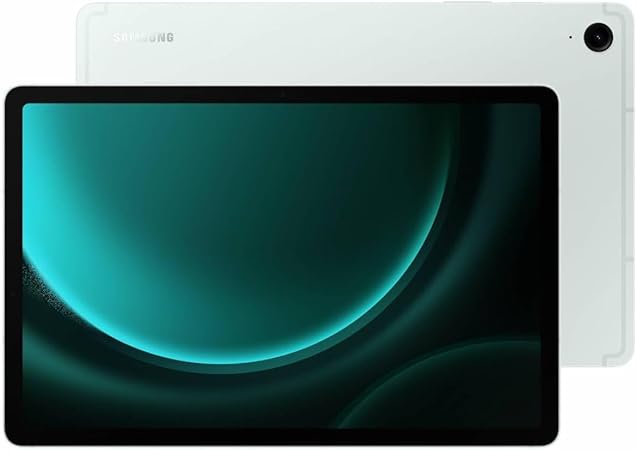
5. Samsung Galaxy Tab S9 FE — Best Budget Option
Specifications
- Display: 10.9” LCD TFT, 2304 x 1440, 90Hz
- Processor: Exynos 1380 (octa-core)
- RAM: 6 GB
- Storage: 128–256 GB, expandable via microSD
- S Pen included
- Battery: 10.090 mAh, IP68 water resistant
Pros
- S Pen included — excellent value
- IP68 water resistance — practical in clinical environments
- Good for browser-based PACS access and worklist review
- Significantly more affordable
Cons
- LCD display — contrast not suitable for detailed image assessment
- 6 GB RAM marginal for large image series
- Smaller 10.9” screen limits side-by-side viewing
Which Tablet Should a Radiologist Choose?
If you want the best image quality and app ecosystem, the iPad Pro 13” M4 is the clear choice. If your institution uses a Windows-only PACS client, the Surface Pro 11 is the only sensible option. The Samsung Tab S10 Ultra makes most sense for MDT meetings and teaching. The iPad Air 13” M2 hits a practical price point if you want iOS and 13 inches without paying Pro prices. The Tab S9 FE is fine for residents who primarily need browser-based PACS access on a budget.
Happy reporting!
Some links on this site are affiliate links (*). If you choose to buy a product using these links, I might get a commission for this purchase. For you, this does not change the price.
