
Updated August 7th, 2026
As a diagnostic radiologist, viewing and analyzing images is a major part of your daily work. A high-quality radiology monitor is essential for seamless viewing and reporting of high-resolution radiology images. Whether you work from home as a teleradiologist or you need to view images when you are on call, you need a computer monitor that is suitable for radiology tasks.
If you need more flexibility, a powerful radiology laptop with a good display might be the option for you. However, if you are using a radiology workstation, a separate high-quality radiology screen is a better option. If you need more radiology gear, you might also like our articles on the best mouse, keyboard or dictation microphone for radiologists. Also read: How to set up the best teleradiology workstation.
The Best Monitor for Radiologists – Top 5 in 2026
What Makes a Good Monitor for Radiologists?
A radiologist has very high technical demands on their monitor. A high-quality monitor is necessary to ensure optimal diagnostic performance and perfect viewing of high-resolution images. The key features are high resolution, high contrast ratio and brightness, wide color gamut, ergonomic design, and wide viewing angles.
1. High Resolution
Radiology images are of very high quality and resolution. High resolution is essential for identifying small pathologies such as undisplaced fractures. A resolution of 4K UHD or higher is recommended for the best radiology monitor in 2026.
2. High Contrast Ratio and Brightness
Most radiological images are displayed in shades of gray. A contrast ratio of 1000:1 or higher is recommended — OLED panels achieve 1,000,000:1 or more, which is a step change for subtle gray-value differentiation. Look for a brightness of at least 300 nits.
3. Wide Color Gamut
For color-coded post-processing, perfusion imaging, and virtual rendering, a wide color gamut matters. A monitor should support 10-bit color depth and ideally 99% DCI-P3 or better.
4. Ergonomic Design
Long reading sessions demand an ergonomic stand with height adjustment, tilt, and swivel. An ambient light sensor and low blue light mode help reduce eye strain over long shifts.
5. Wide Viewing Angles
Ultrawide monitors allow two series to be viewed side by side without a second screen. IPS and OLED panels both offer wide viewing angles with minimal color shift.
The Best Monitor for Radiologists – In Detail
1. Eizo ColorEdge CS2740 — Best Overall

Specifications
- Display: 27” IPS LCD, 3840 x 2160 (4K UHD)
- Contrast ratio: 1000:1, Brightness: 350 nits
- Color: 99% AdobeRGB, 100% sRGB, 16-bit LUT, 10-bit
- Hardware calibration built-in
- Connectivity: DisplayPort, USB-C, HDMI
- Ergonomic stand: height, tilt, swivel, pivot
Pros
- Eizo — the gold standard brand for professional and medical monitors
- Hardware calibration with 16-bit LUT ensures consistent color accuracy
- Anti-glare coating, 4K UHD, 10-bit color depth
- Excellent ergonomic stand
Cons
- High price
- Heavy (10.3 kg) — not easily moved
- IPS panel — contrast not as deep as OLED
2. LG 45GX950A 45” 5K2K OLED (2025) — Best Ultrawide OLED

Specifications
- Display: 45” OLED curved, 5120 x 2160 (5K2K), 21:9
- Contrast ratio: 1,500,000:1, HDR True Black 400
- Refresh rate: 165 Hz, Response: 0.03 ms
- Connectivity: USB-C 90W, DisplayPort 2.1, HDMI 2.1
- NVIDIA G-Sync + AMD FreeSync Premium Pro
Pros
- 45” OLED at 5K2K — exceptional for side-by-side series comparison
- 1,500,000:1 OLED contrast — deep blacks ideal for grayscale radiology images
- USB-C 90W single-cable laptop connectivity
- Dual-Mode: switch between ultrawide and 16:9
Cons
- Gaming-focused — no factory color calibration certificate
- OLED burn-in risk with static PACS interfaces — use pixel refresh settings
- Large footprint on desk
3. Dell UltraSharp U4025QW — Best 5K Ultrawide

Specifications
- Display: 40” IPS, 5120 x 2160 (5K2K), 21:9
- Contrast ratio: 1000:1, Brightness: 300 nits
- Refresh rate: 60 Hz
- Connectivity: Thunderbolt 4 hub, USB-C, DisplayPort, HDMI
Pros
- Ultra-high 5K2K resolution on IPS — no OLED burn-in risk
- Thunderbolt 4 hub: single cable connects laptop, charges it, drives peripherals
- Excellent for side-by-side PACS viewing
- Dell reliability and warranty
Cons
- IPS contrast lower than OLED alternatives
- 60 Hz only — not relevant for radiology, but limits future flexibility
- Potential USB interference with wireless peripherals
⭐ 4. ASUS ProArt PA32DC — Editor’s Pick

I have been using the ASUS ProArt PA32DC for my home reading setup and I am genuinely impressed. The 31.5” OLED panel delivers exceptional blacks — critical when you are assessing subtle gray-value differences in CT or MRI. Color accuracy out of the box is outstanding, and the built-in motorized colorimeter with automatic calibration makes maintaining that accuracy effortless. The 1,000,000:1 OLED contrast ratio and ΔE<1 accuracy would satisfy most workflow needs short of a certified diagnostic workstation. Highly recommended for teleradiology and second-opinion reading.
Specifications
- Display: 31.5” 4K OLED (pure RGB stripe), 3840 x 2160
- Contrast ratio: 1,000,000:1, Response: 0.1 ms
- Color: 99% DCI-P3, True 10-bit, ΔE<1
- HDR: Dolby Vision, HLG, HDR10
- Built-in motorized colorimeter with auto-calibration
- Connectivity: USB-C, DisplayPort 1.4, 3× HDMI 2.0
Pros
- Built-in auto-calibration — no external colorimeter needed
- 1,000,000:1 OLED contrast — exceptional grayscale depth for radiology
- ΔE<1 factory accuracy, Calman compatible
- Full ergonomic stand: height, tilt, swivel, pivot
- USB-C single-cable laptop workflow
Cons
- Premium price
- OLED — static PACS interfaces require pixel refresh settings
- Not an FDA-cleared diagnostic monitor (suitable for teleradiology and non-primary reading)
5. BenQ PD2725U — Best Value 4K
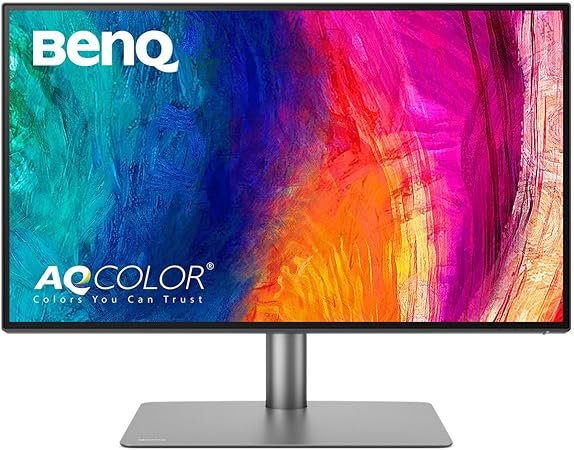
Specifications
- Display: 27” IPS, 3840 x 2160 (4K UHD)
- Color: 100% sRGB, 95% DCI-P3, ΔE≤3, factory-calibrated
- Connectivity: Thunderbolt 3, 2× HDMI, USB hub, 65W USB-C PD
- KVM switch, daisy chain support
- AQCOLOR technology, Pantone validated
Pros
- Excellent price-performance ratio for a factory-calibrated 4K professional monitor
- Thunderbolt 3 + KVM switch — ideal for multi-workstation setups
- Daisy chain up to 2 monitors from a single cable
- Pantone validated, ΔE≤3 out of box
Cons
- IPS panel — contrast lower than OLED alternatives
- 27” — smaller than other options in this list
What Is the Best Radiology Monitor for Your Workstation?
For the most complete professional package, the Eizo ColorEdge CS2740 remains the reference choice with hardware calibration and proven reliability. For maximum screen real estate and OLED contrast, the LG 45GX950A is outstanding for side-by-side series review. The Dell U4025QW offers the same 5K2K ultrawide format without OLED burn-in concerns. From personal experience, the ASUS ProArt PA32DC is the most complete package for teleradiology and second-opinion reading at home: 4K OLED with built-in auto-calibration and ΔE<1 accuracy. The BenQ PD2725U is the best entry point for a factory-calibrated 4K professional monitor.
Happy reporting!
Some links on this site are affiliate links (*). If you choose to buy a product using these links, I might get a commission for this purchase. For you, this does not change the price.
