
Updated August 7th, 2026
As a radiologist working in a hospital or in teleradiology, the center of your desk is your radiology keyboard. You need it for typing and correcting reports, for controlling your PACS and RIS and for several hotkeys such as different window settings for different studies. Text can be typed with any keyboard but there are several features to be considered for the best keyboard for radiology purposes. In this article, we will discuss the most important aspects of a radiologists keyboard and present our choices for the best keyboard for radiologists and teleradiology.
Other radiology gear: Radiology laptops | Best Lead glasses | Radiologists computer mouse | Dictation microphones
The Best Keyboard for Radiologists – The Top 7
What are the Key Features of the Best Keyboard for Radiologists and Teleradiology
The keyboard is the centerpiece of any radiologist’s workstation, located directly in front of the radiologists diagnostic monitor. In addition to the computer mouse, the keyboard is the most important tool to control your radiology workstation. It is known that radiologists have very high technical demands on their gear. A good radiology keyboard cannot only facilitate your workflow but it can also speed up your reading and report-writing process and even be good for your posture and health. The key features of the best keyboard for radiologists are: programmable keys, backlight, ergonomic design, quiet keys, connectivity, durability, and easy to clean.

1. Programmable keys
If you can program some keys on your keyboard, you can significantly facilitate any radiological workflow. Especially when reading CT images, a radiologist needs specific window options to change between lung, bone or soft-tissue windows. Additionally, keys can be programmed with individual hanging protocols or standard report templates. And if your keyboard does not have enough programmable keys, you can still expand your workstation with a radiological keypad.
2. Backlight
The typical radiology reading environment is a dimly lit room to allow for high contrast images on the radiologists monitor. A keyboard with backlit keys is therefore very helpful. Ideally the backlight is dimmable, and some advanced keyboards feature intelligent backlighting that adjusts to ambient light automatically.
3. Ergonomic design
Radiologists spend several long hours reading images and writing reports. An ergonomic keyboard can help reduce the risk of repetitive strain injury. Options include adjustable angles and split keyboards — ultimately a personal choice that may require testing different models.
4. Quiet keys
If you work in a shared reading room, keyboard noise can be distracting. Quiet keys are a practical consideration — though some radiologists prefer the tactile feedback of a mechanical keyboard.
5. Connectivity
A wireless keyboard reduces cable clutter and allows flexibility — especially useful if you combine your keyboard with a mobile teleradiology workstation.
6. Durability
Most professional keyboards withstand several million keystrokes. If you primarily use a speech recognition microphone, key wear is less of a concern — but for budget options, check key quality carefully.
7. Easy to clean
When bringing a personal keyboard into a hospital, hygiene matters. Gaps between keys accumulate germs. A flat, easy-to-disinfect surface — as found on medical-grade keyboards — can be important in clinical environments.
The Best Keyboard for Radiologists – In Detail
1. Das Keyboard Model S — The Allrounder

Pros
- Mechanical Cherry MX Brown switches for tactile feel and quiet operation
- Durable laser-etched keycaps
- Built-in USB hub
- Quick access media keys
- Sleep function to save energy
Cons
- No backlights
- Only F1-F12 as programmable keys
- No wrist rest
- No wireless option
2. Logitech MX Keys Mini — The Minimalist

Pros
- Compact minimalistic design
- Intelligent illuminated keys that automatically adjust to lighting conditions
- Wireless (Bluetooth) and USB-C connectivity
- Cross-platform compatibility
Cons
- No numeric keypad
- Slightly smaller keys
- No adjustable tilt
3. Logitech MX Mechanical — The Silent One

Pros
- Noise-reduced mechanical switches with satisfying tactile experience
- Intelligent illuminated keys that automatically adjust to lighting conditions
- Both Bluetooth (wireless) and USB-C connectivity
Cons
- More expensive
- More difficult to clean/disinfect
4. Goldtouch GTN-0099 V2 — The Ergonomic

Pros
- Ergonomic design: 0–30° horizontal and vertical adjustment to straighten wrists
- Soft key touch with low activation force
Cons
- Non-standard layout
- No numeric keypad
- No backlighting
5. Purekeys Medical — The Clean One
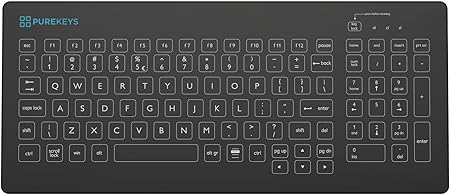
Pros
- Medical grade: meets hygiene standards for hospital/clinical use
- Completely flat surface — easy to disinfect in seconds
- Quiet and responsive keys
Cons
- No backlighting
- Wired only
6. Razer BlackWidow V4 — The Gamer

Pros
- High-quality linear and silent mechanical switches
- Programmable command dial
- 8 dedicated macro keys, 4 media keys
- Chroma RGB adjustable lighting
- Ergonomic wrist rest included
Cons
- Bulky design
- Wired only
- Gaming-focused aesthetics
- More expensive
7. Cherry Stream — The Budget Option

Pros
- Excellent price-performance ratio
- Cherry SX scissor mechanism — stable and precise
- Lightweight and compact
Cons
- No backlight
- Wired only
- No programmable keys
- No wrist rest
What Is the Best Radiology Keyboard?
Every radiologist has specific needs — for some a durable, high-quality keyboard is sufficient, while others look for programmable keys and macros. Maybe you also want to write a blog post or scientific manuscripts on the side. Hopefully this overview helps you make an informed decision.
Happy reporting!
Some links on this site are affiliate links (*). If you choose to buy a product using these links, I might get a commission for this purchase. For you, this does not change the price.
A keyboard makes a poor surprise and an excellent request. For the other direction, when somebody asks what to get you, there is a separate list of gifts for radiologists.
